
TikTok Shop Seller Center
TikTok Pte. Ltd.Shopping
4.31.66K Reviews
- Version
- 11.4.1
- Installs
- 50.00M
- Age Rating
- Everyone
Screenshots
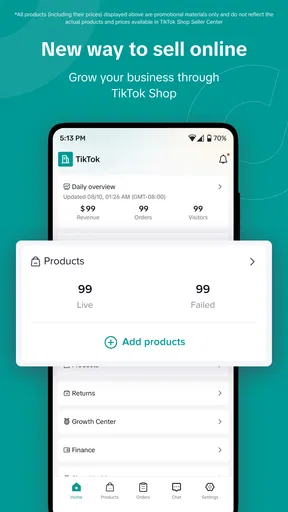
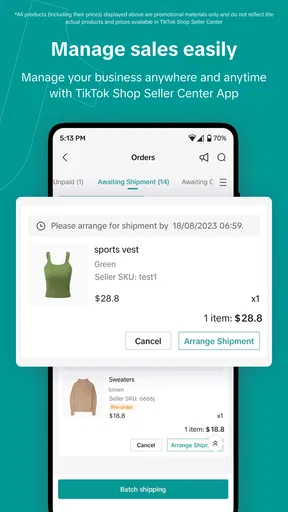
Our Review of TikTok Shop Seller Center
 Analysis by Appyee
I approached TikTok Shop Seller Center as a seller’s working tool rather than as another shopping app. Its purpose is straightforward: it lets merchants manage selling activity from a phone while staying close to the TikTok environment where product discovery happens. That makes it interesting for small businesses, independent creators, and anyone who wants a mobile-first way to keep an eye on a store.
The first thing I would ask before installing it is not whether it is free, because it is, but whether TikTok is already part of your selling strategy. If your customers discover products through short videos, live content, or creator-led recommendations, the connection between content and commerce can be genuinely useful. If you mainly sell through a traditional online storefront, marketplace listings, or in-person transactions, the app may feel like an additional system to maintain rather than a complete replacement.
How I judged the app as a seller
I looked at it through the decisions a seller makes during an ordinary day: checking what needs attention, keeping product information organized, responding to activity around a shop, and deciding whether a mobile workflow is enough for serious work. A seller app should reduce the distance between noticing a problem and acting on it. That matters when you are away from a desk, preparing an order, filming content, or simply trying to keep business tasks from taking over the evening.
The app comes from TikTok Pte. Ltd. and is listed as a free shopping app for everyone. It is available for devices running Android 6.0 or later, which makes it accessible to people using older compatible phones as well as newer models. The current version is 11.4.1, so I would still keep the app updated when possible, especially for a tool connected to selling activity.
Its public reception is also worth putting into perspective. It holds a 4.3 average from around 443 thousand ratings, with roughly 1.7 thousand written reviews, and has passed 50 million installs. Those figures suggest that it has reached a substantial audience, but popularity should not be confused with suitability. A large install base tells me that the workflow is relevant to many sellers; it does not guarantee that it will match the way you manage inventory, customer communication, or fulfillment.
The mobile workflow is the main decision
For me, the central question is whether your business benefits from making decisions while you are mobile. A desktop dashboard is usually more comfortable for long product edits, careful catalog organization, and comparing several pieces of information at once. A phone app is better suited to quick checks between other tasks. That distinction is more important than the simple promise of selling from a phone.
Imagine a small clothing seller who has just finished recording a product video. Instead of waiting until returning to a computer, the seller can use the mobile environment to stay close to the shop side of the business. The advantage is not merely convenience. It is the reduced chance that a promising moment of attention turns into a delayed administrative task. The trade-off is that a phone screen encourages short actions, not necessarily deep catalog maintenance.
I would therefore use the app as a command center for timely decisions, while treating a larger screen as the better place for work that requires concentration. That division of labor is one of the most practical ways to avoid frustration. Trying to force every store-management task into a phone can make a capable app feel restrictive.
Where the TikTok connection gives it an edge
The strongest reason to choose this tool is the relationship between selling and discovery. In many shopping systems, a product page waits for a shopper to search for it. TikTok’s environment is different because products can appear alongside entertainment and creator content. For a seller who understands that style of discovery, the shop is not isolated from promotion; it sits near the activity that can bring attention to products.
This is especially useful for items that are easy to demonstrate visually. A kitchen accessory, beauty product, clothing piece, craft item, or novelty gift may be easier to understand when shown in use than when presented as a static listing. The app makes the most sense when your selling approach can benefit from that kind of presentation and when you are willing to think about product communication as content, not just catalog text.
There is also a useful psychological advantage to keeping selling tasks close to the content environment. When a product idea comes from a comment, a video response, or a recurring question from viewers, a mobile seller tool can help you treat that signal as part of the commercial workflow. I would not assume every interaction becomes a sale, but the proximity between audience behavior and shop management can make it easier to spot what deserves attention.
My practical tip is to separate “content ideas” from “store maintenance” in your routine. Use the app when you need to act on a timely selling task, but do not let the speed of social content push you into careless product edits. Fast discovery is valuable only when the underlying listing, availability, and customer experience remain dependable.
What makes it useful for a small operation
A one-person business often has no separate marketing employee, catalog manager, and operations team. The same person may answer questions, create videos, check demand, prepare packages, and handle the accounts. For that seller, a mobile tool can remove a layer of friction. You can work from a shop floor, a studio, a market stall, or a home office instead of being tied to a single computer.
This can also help sellers who are testing an idea rather than running a mature catalog. A cautious newcomer may prefer starting with a free app rather than committing immediately to a more elaborate commerce platform. The low entry cost makes experimentation less intimidating, although free installation does not remove the work involved in product presentation, customer service, packaging, and fulfillment.
I would be particularly interested in this app for a seller whose products change with trends or seasonal attention. A mobile workflow is valuable when a product’s relevance can shift quickly. It is less compelling for a business with a large, stable catalog that depends on detailed bulk administration and carefully structured back-office processes.
Three habits that make the experience better
First, I would establish a short daily review rather than opening the app constantly. Checking at planned moments helps distinguish urgent store activity from the endless pull of social media. It also makes it easier to notice patterns instead of reacting to isolated events. A seller who opens the app only when something feels wrong may miss the benefit of having a regular operational rhythm.
Second, I would keep product information prepared outside the moment of publishing. Draft your descriptions, product details, and visual assets in a separate working process so the phone is used for execution rather than improvisation. This is a small but important trade-off: mobile tools encourage speed, while accurate selling often depends on preparation.
Third, I would use the app to support a clear handoff between promotion and operations. After publishing content that highlights an item, make a deliberate check that the shop side is ready for the attention it might receive. This does not require assuming that every video will perform well. It simply prevents the common mistake of treating promotion as complete while the commercial details remain unfinished.
Where a traditional storefront may fit better
The app is not automatically the best choice for every seller. A conventional ecommerce platform may be a better fit if your business already has a loyal audience that visits a dedicated website, if search traffic is central to your sales, or if you need a highly customized storefront experience. In those situations, TikTok can still be useful for awareness, but the seller app may be better viewed as one channel rather than the foundation of the entire business.
A general marketplace can also suit sellers who want to meet shoppers with strong purchase intent. People who visit a marketplace are often already comparing products, prices, and delivery options. TikTok’s discovery-led setting can create interest from people who were not actively shopping, which is powerful but less predictable. I would choose the marketplace-first route when dependable search visibility matters more than demonstrating products through content.
There is another important alternative: direct selling through social messages or a simple payment process. That approach may feel easier at a very small scale, especially for personal networks and custom orders. However, it can become difficult to track as the number of products and customers grows. TikTok Shop Seller Center is more appropriate when you want a recognizable selling structure rather than a collection of informal conversations.
For larger teams, a desktop commerce suite may remain the better primary system. Multiple staff members, complex stock arrangements, detailed reporting needs, and extensive catalog edits can all favor a more spacious interface. I would not replace a mature operation with a phone-centered tool simply because the app is convenient. Convenience matters, but operational clarity matters more once mistakes become expensive.
The cost of changing your selling routine
Installing a free app is easy; changing the way a business works is not. The real cost of switching is the time spent learning a new workflow, adapting product presentation to TikTok’s style, and deciding which tasks belong in the mobile app and which should stay elsewhere. There is also a mental cost: sellers must be comfortable connecting commerce with public-facing content and accepting that attention can be uneven.
If you already sell through another channel, I would avoid moving everything at once. Start with a limited selection of products that are visually easy to explain and simple to fulfill. This gives you a realistic test of the content-to-sale relationship without placing the entire catalog into a new routine. It also makes it easier to identify whether the app is helping with actual business work or merely adding another place to check.
Keep a simple record of the effort required for each product. Note how long it takes to prepare the content, maintain the listing, handle questions, and complete the order process. The important comparison is not just sales volume. It is whether the attention and administrative time are reasonable for the margin and repeat potential of the item.
Another cost is divided attention. TikTok is designed to keep users engaged with content, while a seller needs to make deliberate operational decisions. I would open the app with a task in mind, complete that task, and leave rather than mixing store management with casual scrolling. That boundary is easy to describe and surprisingly valuable in practice.
Who should install it, and who should wait
I would recommend trying it if you are an independent seller who already creates TikTok content, sells products that benefit from demonstration, or needs a way to keep commerce tasks close at hand. It is also a sensible option for a small business exploring a new sales channel without paying for the app itself. The free price and broad device compatibility lower the barrier to testing the workflow.
I would be more cautious if your business depends on a polished standalone website, highly structured wholesale ordering, or complex catalog administration. In those cases, use a dedicated commerce system as the main workplace and consider TikTok only where its discovery model genuinely adds value. I would also skip it as a primary tool if you dislike making content or have no interest in being present in a fast-moving social environment.
Age suitability is listed as Everyone, which makes the app broadly accessible from a content-rating perspective. That does not remove the need for mature business judgment. Selling still involves accurate descriptions, responsible communication, careful fulfillment, and attention to customer expectations. The rating describes access, not the level of discipline required to run a shop well.
My recommendation after weighing the trade-offs
My recommendation is to treat TikTok Shop Seller Center as a focused mobile selling companion, not as a universal replacement for every commerce tool. Its value is highest when your products can be discovered and explained through TikTok content and when you need to make timely decisions away from a desk. In that situation, the connection between audience attention and shop activity is a meaningful advantage.
I would start with a small product group, create a repeatable daily review, and judge the app by the quality of the workflow rather than by the excitement of a single spike in attention. If it helps you move from product discovery to organized selling without losing control of the details, it has earned a permanent place in your routine.
If your priorities are search-led shopping, extensive catalog administration, or a highly customized storefront, another category of tool may serve you better. That is not a weakness unique to this app; it is a reminder that mobile social commerce and traditional ecommerce solve different problems. Choose this app when TikTok is where your customers notice products, not merely because selling from a phone sounds convenient.
For my own decision, that distinction makes the app worthwhile for creators and small sellers with a visual, fast-moving product strategy. I would recommend testing it carefully, keeping the operational basics organized, and letting the results of your actual routine decide whether it becomes your main selling workspace or simply another useful channel.
Verdict
Strengths of TikTok Shop Seller Center
- Centralizes orders, inventory, shipping, and customer messages in one app.
- Provides sales analytics to help sellers track products and campaign performance.
- Supports product listing management directly from a mobile device.
- Offers tools for managing promotions, discounts, and affiliate collaborations.
- Useful for responding quickly to buyers while away from a desktop computer.
Limitations of TikTok Shop Seller Center
- Availability and features vary by country and TikTok Shop market.
- Some advanced seller tools may still require access through the web dashboard.
- Managing many products on a phone can become time-consuming.
- Seller performance depends heavily on TikTok traffic and content visibility.
- Fees, policies, and fulfillment requirements may change over time.
Other Releases by TikTok Pte. Ltd.
View All
TikTok - Videos, Shop & LIVE
Social4.0

TickTock-TikTok Live Wallpaper
Tools4.7

TikTok Studio
Video Players & Editors4.5

PineDrama - Short Dramas
Entertainment4.6
Similar Picks in This Category
View All
SHEIN-Shopping Online
Roadget Business PTE. LTD.4.8

Amazon Shopping
Amazon Mobile LLC4.4


Mercado Libre: Compras online
Mercado Libre4.8

Wish: Shop and Save
Wish US Holdings LLC4.7

Alibaba.com - B2B marketplace
Alibaba Mobile4.4
Frequently Asked Questions
What is TikTok Shop Seller Center used for?
TikTok Shop Seller Center is the management platform for merchants who sell products through TikTok Shop. After signing in, sellers can add and organize product listings, manage inventory, process orders, arrange shipping, communicate with customers, review sales performance, and access promotional tools. It is designed for sellers and brands rather than ordinary TikTok users who only want to browse or purchase products.
Can anyone register as a TikTok Shop seller?
Registration requirements depend on the country or region where TikTok Shop is available. Sellers may need to provide identity or business verification documents, tax information, bank details, a valid address, and other account information. Some product categories also require additional approval. Before downloading or registering, check the current eligibility rules in your market because availability, seller requirements, and supported business types can change.
Does TikTok Shop Seller Center work on both Android and iOS?
TikTok Shop Seller Center may be available through mobile applications, web tools, or both, depending on your region and the current TikTok Shop rollout. The mobile experience is useful for checking orders, replying to customers, updating listings, and monitoring sales while away from a computer. However, certain advanced catalog, analytics, advertising, or account-management functions may be easier to use from the desktop Seller Center.
What fees or costs should sellers expect?
Using TikTok Shop Seller Center itself may not require a separate download fee, but selling through TikTok Shop can involve transaction fees, commissions, payment-processing charges, shipping-related costs, affiliate commissions, advertising expenses, refunds, or other marketplace deductions. The exact amounts vary by country, category, seller program, and promotions. Review the latest fee schedule inside your seller account before setting prices or calculating profit margins.
Is TikTok Shop Seller Center safe for managing orders and payments?
The platform provides seller tools for handling orders, product information, customer messages, payouts, and performance data, but sellers still need to protect their accounts carefully. Use the official TikTok Shop Seller Center app or website, create a strong unique password, enable available security features, and avoid suspicious links requesting login or banking details. Also verify customer-service messages and payment information through official account channels.
